Powered by Blogger.
Showing posts with label Yahoo. Show all posts

Find who is Invisible on Yahoo messenger

Posted by Rahil Sunday, January 23, 2011 0 comments

  Sometimes some of your friends who appear offline in yahoo messenger may not be actually offline, they may in the 'Invisible' mode. This maybe if they are trying to ignore you or are too busy to talk to anyone.

There is this small trick that you can use to find out what the truth is.

Firstly open your yahoo messenger main window and double click on the name of the person whom you want to check. The chat window will open obviously.
Click IMVironment button, select See all IMVironments, select Yahoo! Tools or Interactive Fun, and click on Doodle.
After loading the Doodle imvironment there can be two possibilities

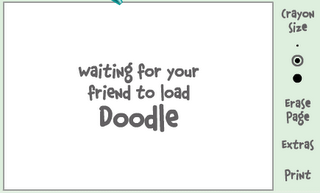
1.If the user is offline Doodle are will show this "waiting for your friend to load Doodle" continuously .See in the picture below:
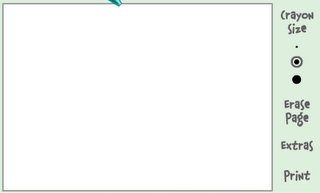
2. If the user is online (but in invisible mode), after few seconds (it can take up to one minute, depending on your connection speed), you should get a blank page like in the picture below. So you know that the user is online.
 

Enjoy Friends

Manage All Your IM Accounts In One

Posted by Rahil Tuesday, December 28, 2010 0 comments


Tired Of Managing All Your Instant Messaging Accounts Like Yahoo ,G Talk, MSN, My Space, etc... ?? , Then Here Is A Service Which Provides You The Facility To Sign Into All These Accounts With A Single Account.

Meebo.com Provides You This Service For Free . You Just Need To Sign Up For A FreeMeebo Account And Give Up Your IM Account's Informations , And After That You Just Need To Signin To This Meebo Account For Managing All Your IM Accounts.

Add Yahoo! Buzz button on Blogger Template

Posted by Rahil Sunday, October 31, 2010 0 comments

Yahoo opened Buzz!, a Digg like site to share stories, to all publishers. Add Buzz! button on your Blogger template.

This is a short post which explains how to add Yahoo! Buzz buttons on your Blogger template. It's really very simple!


Take a look at this page to see what kind of buttons are available and choose the style you prefer. For example, if you choose Square button style:


...copy and past the following code in your blogger template (a good position is under post's title):

<script type="text/javascript" src="http://d.yimg.com/ds/badge2.js" badgetype="square"><data:post.url/></script>


In any case, if you choose a different button, you have only to change the string ARTICLEURL in the code with <data:post.url/>.

It's all! For questions or update about this topic contact me or add a comment

Log into Two/ Multiple Yahoo Messengers at the same time

Posted by Rahil Thursday, August 19, 2010 0 comments

Have multiple yahoo accounts ? Tired switching between the messenger accounts one by one..? This tip is for you..

Usually , if we have multiple yahoo accounts , you must have to log out of the current messenger id if you want to switch to another account. But, with this trick, you can log into multiple yahoo messenger accounts at the same time..

Let's see how to do that: (for windows xp users)

1. Click on the Start » Run
2. write "regedit" and hit Enter
3. Now, on the left pan, browse to HKEY_CURRENT_USER » Software » Yahoo » Pager » Test
4. Now, Right click on that 'Test' folder and select New » DWORD Value and name that new folder as Plural
new dm value
5. Next , Right click on the "Plural" folder and select "Modify"
6. And Enter this information :
Value data : 1
Base : Decimal

edit dword value

and Click on 'OK'.

Now Close your Registry Editor by going to File » Exit 

Done! Now, you can log in to as many Yahoo accounts as you can simultaneously... Enjoy!

Multiple yahoo instances without any software

Posted by Rahil Wednesday, August 18, 2010 0 comments


Follow these steps
1. Go to Start ----> Run . Type regedit, then enter .


2.Navigate to HKEY_CURRENT_USER --------> Software --->yahoo ----->pager---->test


3.On the right pane , right-click and choose new Dword value .


4.Rename it as Plural.


5.Double click and assign a decimal value of 1.


That's it done!!
Now close registry and restart yahoo messenger .For signing in with new id open another messenger


Calling from PC to mobile phones without paying anything was never so easy. Using Yahoo Messenger, you can make unlimited free calls to any mobile number in the world from your computer. All you need to have is the latest version of Yahoo Messenger installed on your system, one microphone to talk and one headphone to listen. This trick works for all mobile numbers in India, USA, UK and many other supported countries. The cool thing about this free call trick is that it’s absolutely free, requires no credit card and it’s unlimited.

MAKING PC TO MOBILE PHONE CALLS FREE

1. Download and install the latest version of Yahoo Messenger (Yahoo Messenger 10 final)
2. Login to Yahoo Messenger and configure microphone and headphone settings
3. Dial 18003733411 inside Yahoo messenger and hit Enter
Free PC to Mobile Calling
4. A new window will pop up with the call details
PC to Mobile Unlimited Calling
5. Your call will be attended by a IVR system. Wait until the IVR system says “Free Call”, which is usually the last option. Without pressing any key on your keyboard, say “Free Call” loudly. The voice recognization system will understand your command and will take you to the next step
5. In the next step, you can hear an advertisement which lasts for few seconds. Do not press any keys during the advertisement
6. After the advertisement, the IVR system will ask “Please dial the phone number country code first, don’t forget to dial 1 for north america”. Which means for Indian numbers, you have to dial 91 before the mobile number, for USA numbers you have to dial 1 before mobile number and so on..
Calling Mobile Numbers from PC PC to Mobile Calling
7. Your call will get connected and you can talk non stop for 7 minutes. Repeat the same process again if you want to talk again. This service provides real unlimited and free international calls to most supported country’s mobile numbers.
This free PC to mobile call trick works because 18003733411 is an USA based toll free number. It offers free calling to any number and earns money by playing advertisements before the calls. This is the actualunlimited international calling trick as you can make as much calls as you want.

Online Marketing
TopOfBlogs Technology blogs Internet Blogs
Computers (Hardware) - TOP.ORG Blogarama - Blog Directory tricks and tips One way text links
Submit Your Site To The Web's Top 50 Search Engines for Free!
Visit this site.

Enter email here

Join This Blog