Powered by Blogger.
Showing posts with label Tricks. Show all posts

Now a Days Google is very strict for Spamming blogs, So they Automatically Remove the blog  which is spamming and disables their account. But There  is a chance For Getting Ur Contents back I mean Post .So that you Dont Lose Ur Post From the Remove blog


here is the picture of a blog that is Removed by Google for spam


So When Ur Blog Disabled By Blogger U can Give A Appeal To Get back ur Account .So it will be reviewed by Google team
And wait for 1 week .
And still if u cant get back Ur account there is solution for getting back Your contents (post) from  Your deleted blog
By following Simple steps
  • Create a new blogger account associated with a new email id
  • Register a New Blog
  • Log on to dashboard
  • Below u can see READING LIST Tab
  • Click BLOGS I AM FOLLOWING


  • You Can see a Add Button Below that Tab
  • Click That
  • Enter The URL Of the Deleted Blog For the Reason of Spam
  • Now You can See The name Of the deleted blog in the BLOGS I AM FOLLOWING TAB
  • Click On That Blog

  • Now Click VIEW IN GOOGLE READER in the Corner
You can now see your deleted blog Posts ,So copy that  and Paste in your new blog
if u like this post please leave a comments

Add Social Bookmark Buttons In Blogspot Blog

Posted by Rahil Thursday, February 17, 2011 0 comments

Now you can add Social Bookmark Icons and Buttons in your Blogspot Blogs very easily. So many new bloggers are searching for this article . After reading this article you will be able to put the Social bookmark icons in your blog easily and also you can customize your icons if you want. For Adding the Social Bookmark icons in you blog you need to add few line of code in you blog's Edit HTML Section. Detail Tutorial  how to Add Social Bookmark Buttons in Blogspot blog is given below.

How to Add Social Bookmarking Icons in Blogger:

Login To Your Blogger Account
On Your Dashboard, Click On Layout

 Now Click On Edit HTML
                        

 Now Check the box of Expand Widget Templates
                                       
Now Find this code: <data:post.body/>

Click Here To Download The Code

After Downloading Copy The Code Replace <data:post.body/>  With The Code

Save your Template and Done, Now check your blog post you will find the icons ready to go

Write Colorful Scrap in Orkut

Posted by Rahil Saturday, February 12, 2011 0 comments

For writing Colorful scrap, follow the steps:

1) Open any scrapbook.

2) Write your message in the scrap. Do NOT click on submit.

3) Copy the following text and paste it in your address bar


4) Hit ENTER key .

5) Click on Submit
Your scrap is now multicolored

Direct Link To Any Page You Want In Hotmail

Posted by Rahil Wednesday, February 9, 2011 0 comments


This is for people who don't know how to direct link to .php pages on the web. If you are on a private computer, and don't mind auto-logging in, you will be able to access your folders much faster than going straight to hotmail.com


You will need a bit of information. Log into the hotmail main page. You will see a web address similar to the following:
http://by211.bay211.hotmail.msn.com/cgi-bin/hmhome?fti=yes&curmbox=00000000%2d0000...

It won't be exactly the same but it will be similar.
It's time to shorten this up. The only bit of information you really need is the direct web address to the server that contains your particular account. In the above example, you would just need:
CODE
http://by211.bay211.hotmail.msn.com/cgi-bin/

Just copy this section from your particular server addy in your browser's address bar.
Now that the explanation is over, these are the commands you can append to the above example to reach specific pages.
'hmhome' - MSN Hotmail - Today
'HoTMaiL' - Inbox
'HoTMaiL?&curmbox=00000000-0000-0000-0000-000000000005' - Junk E-Mail
'HoTMaiL?&curmbox=00000000-0000-0000-0000-000000000004' - Drafts
'HoTMaiL?&curmbox=00000000-0000-0000-0000-000000000003' - Sent Messages
'HoTMaiL?&curmbox=00000000-0000-0000-0000-000000000002' - Trash Can
'compose' - Compose Message
'addresses' - Address Book
'options' - Options, Duh
'options?section=mail' - Mail Options
'options?section=personal' - Personal Details
'protect?screen=filter' - Junkmail Filter
'options?section=contacts' - Contact Options
------------------------------------------------------------------------------------
Remember, you just need to place these commands directly after 'http://.../cgi-bin/' without spaces.
If you have never tried this before, it works on many websites. So, if you don't like navigating websites, and would rather do that through your web-browser,

Go ahead and do it.

Leave Comments

Fool keylogger and protect yourself from hackers

Posted by Rahil Wednesday, February 2, 2011 0 comments

when you surf net at public computers or net cafes…maybe it can be even at your friends house..etc.. there is a danger that a possible key logger software can steal your password, so i have come up with a simple and effective way to counter it…at least 50% …

lets see how simply you can fool a key logger,

When you choose passwords try using simple, capital & numbers as a combination..

when you enter them in a public computer rather than entering it in sequence try entering it in a combination

for this trick suppose my password is - hi2K1987 [DEMO password]

Now when you break your password into 3 combinations and enter them one after another (without using the backspace key) so what i did was i entered 2k first then using the mouse i went to the start of the password field and entered hi then i placed the cursor at the end and entered 1987 now simply the key logger is fooled.

he will read mah password as: delghi2k1987(fooled)

 Here is a 100 % working trick to unlimited use BSNL 3G at the cost of
Normal GPRS

First of all Buy a normal 2g bsnl's sim card and keep balance 50+ rs.
now activate gprs by sending sms GPRS PRE to 53733 It will be
activated in 24 hours, after activation get gprs settings by calling customer care

Now do e-recharge with 230 rs (or whatever unlimited plan exists in your area)
in it, After activation You have to chnage only one thing in your 3G enabled cell.

Go to settings>tools>settings>phone&g
t;network>network mode> now select UMTS

THEN do manual searching for network u will fing bsnl 3g network there wid small 3g logo along wid its name, select it as default

Now see your data singnals logo, it is converted into 3G
You will get near about 500kbps to 1200 kbps speed
Remember use BSNLEGPRS or BSNLPREPAID as your access point


Working Good if any problem Leave Comments 

Speed up your internet by 20%More

Posted by Rahil Saturday, January 29, 2011 2 comments

   Microsoft reserves 20% of your available bandwidth for their own purposes like Windows Updates and interrogating your PC etc

You can get it back:

Click Start then Run and type "gpedit.msc" without quotes. This opens the group policy editor.

Then go to:
--> Local Computer Policy
--> Computer Configuration
--> Administrative Templates
--> Network
--> QOS Packet Scheduler
--> Limit Reservable Bandwidth.
 
Double click on Limit Reservable bandwidth.
 It will say it is not configured, but the truth is under the 'Explain' tab i.e." By default, the Packet Scheduler limits the system to 20 percent of the bandwidth of a connection, but you can use this setting to override the default."
So the trick is to ENABLE reservable bandwidth, then set it to ZERO. This will allow the system to reserve nothing, rather than the default 20%.It works on Win 2000 as well. 

Find who is Invisible on Yahoo messenger

Posted by Rahil Sunday, January 23, 2011 0 comments

  Sometimes some of your friends who appear offline in yahoo messenger may not be actually offline, they may in the 'Invisible' mode. This maybe if they are trying to ignore you or are too busy to talk to anyone.

There is this small trick that you can use to find out what the truth is.

Firstly open your yahoo messenger main window and double click on the name of the person whom you want to check. The chat window will open obviously.
Click IMVironment button, select See all IMVironments, select Yahoo! Tools or Interactive Fun, and click on Doodle.
After loading the Doodle imvironment there can be two possibilities

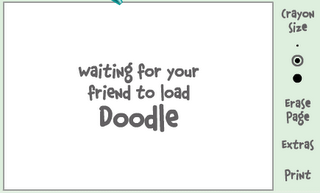
1.If the user is offline Doodle are will show this "waiting for your friend to load Doodle" continuously .See in the picture below:

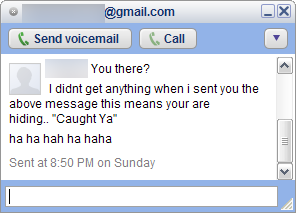
2. If the user is online (but in invisible mode), after few seconds (it can take up to one minute, depending on your connection speed), you should get a blank page like in the picture below. So you know that the user is online.
 

Enjoy Friends

FIRST METHOD
You need a PC or a Laptop and the required connectivity tools ,ie.,
Serial/USB cable OR Infrared Device OR Bluetooth dongle

1) Activate Airtel Live! ( It’s FREE so no probs)
2) Create TWO Airtel gprs data accounts (yep TWO) and select the
FIRST as the active profile.
3) Connect your mobile to the PC (or Laptop) and install the driver for
your mobile’s modem.
4) Create a new dial-up connection using the NEW CONNECTION Wizard as follows:

Connecting Device : Your mobile’s modem
ISP Name : anyname (anything you like)
Phone Number : *99***3# / Try 99***1
Username and Password : blank
5) Configure your browser and download manager to use the proxy
100.1.200.99 and port 8080.( My advice is to use Opera since you
can browse both wap and regular websites)
6) Connect to the dial-up account. You will be connected at 115.2
kbps (but remember, that is a bad joke).
7) Pick up your mobile and try to access any site. You will get “Access
Denied…”(except for Airtel Live!). IT DOES NOT MATTER.
Keep the mobile down.
8 ) On the PC ( or Laptop) open your browser, enter any address ,
press ENTER and…….WAIT
9) After a few seconds the page will start to load and you have the
Whole Internet at your Disposal.

SECOND METHOD:
First Go to settings menu then to connectivity tab now choose the option Data comm. then "DATA ACCOUNTS" go to new account now the settings r as follows
ACCOUNT TYPE:GPRS
NEW ACCOUNT NAME:A1
APN:airtelfun.com
User name: (blank)
Password: (blank)
Now save it
NOW!


Go to Internet Setting in connectivity here choose intrnet profile--go to new profile setting are As below
NAME:A1
CONNECT USING:A1(which was created in data comm.)
Save It
Now you would be able to see it now selest it and take "more" option then select setting here in use proxy option it will be selected no if it is no then change it into yes
Now Go to Proxy address and give the adress as
100.1.200.99 and then the port number as 8080
User name:
Password:


Now save all the settings You made . Come back 2 connectivity
choose streaming settings now in connect using option choose a1 that we created leave the use Proxy option as no itself
These Are The Settings
now access airtel live! from ur activated SE phone goto VIDEO GALLERY OR VIDEO UNLIMITED(varies according to states) choose live streaming then choose CNBC OR AAJTAK WHILE CONNECTING TO MEDIA SERVER cancel AFTER 9 or 10 sec then type any web adress if it shows access denied then once again select CNBC and wait for a few more sec than before if its fully connected also no prob its free then cancel it or if ur connected then stop it and the internet is ready to take of .


GOOD LUCK  AIRTEL USERS

leave comments
 

Free Bsnl Gprs To Access Internet

Posted by Rahil Wednesday, January 19, 2011 0 comments

U Can Surf For Free Via Gprs On Pc Too
I came to know of using BSNL GPRS for FREE with FULL ACCESS to All Sites.
Here is the way.
1.Create 2 connections with different names like "BSNL PORTAL" and "CELLONE PORTAL" with following settings.


Access Point Name-
"celloneportal"
Proxy Service Address-
"192.168.51.163"
Proxy Port-
"8080"
Security-
"NORMAL"

Rest fields to be as it is.
2.
now open phone's default inbuilt browser and select any of the two settings created to access the web.you will now access only bsnl's home site.

3.now keep browser working and open another browser for full internet access like opera or netfront.in these browsers use the second setting created. make sure to use second setting this time. connect to open a page. you get an error message like "ACCESS DENIED" but you don't worry

4.keep both browsers working in background and open connection manager. in connection manager just disconnect the connection that is not working like the second one you used to connect opera or net front

5.again open opera or netfront from background and this time use the first connection that you are using to connect with default inbuilt browser to connect to internet.

6.sure this time you are connected with full access.

Disable or enable a users abilty to run REGEDIT.
Go to START–>RUN and typeREGEDIT. This will open the registry editor.
Find the following registry key:

HKEY_CURRENT_USER\SOFTWARE\Microsoft\
Windows\CurrentVersion\Policies\System

Change the following value:
DisableRegistryTools
Set it to 0 to allow regedit
Set it to 1 to disable regedit

Multi Google Talk Without any Software

Posted by Rahil Tuesday, January 18, 2011 0 comments

1) Right click on the Google Talk shortcut.
2) click on Properties.
3) Go to Shortcut tab on Google Talk Properties window.
4) On the Target textbox, add in the /nomutex to the end of the line so that it looks like below (or you can simply copy and paste the below syntax and replace the original).
“c:\program files\google\google talk\googletalk.exe” /nomutex
5) Click on OK.
  I didn't have to do anything after this and clicking on the shortcut multiple times just gave me different Google talk window.


Alternative

To create a new shortcut for Google Talk:

1) Right-click on the desktop or anywhere you want to place the GTalk shortcut.
2) Select New on the right click context menu.
3) Then select Shortcut.
4) Copy and paste the following line to the text box when prompted to type the location of the item:
“c:\program files\google\google talk\googletalk.exe” /nomutex

5) Click on Next.
6) Give the shortcut a proper name such as Google Talk or Google
Talk Multiple or Google Talk Polygamy.
7) Click OK until you are done.


Leave Comments

Find Who Is invisible In Gtalk

Posted by Rahil Monday, January 17, 2011 3 comments

We always have many ways to find out if user is invisible or offline on yahoo. But finding if the user is offline on Google Talk is tough before this.
Follow the steps and you will end up finding the actual status of the user.
  • Open The Chat window of the user, you want to check the status.
  • Click on option and click on “Go Off the Record”
go off the record
  • Now message user
  • If you get something in red that the user is offline and can’t receive messages that means the user is offline
offline
  • If you didn’t get any message in red that means user is online in invisible mode..:)
google talk invisible
Invisible on Google talk
Now Enjoy the tip and catch your friends who pretend to be offline.


Sometimes its always healthy to shutdown your PC if you are not using it. I mean, suppose you are downloading a file that will be completed at an estimated time of say 1 hour. You can avoid sitting in front of the monitor till the download is complete. just use the below freeware software to shutdown the computer automatically after a specific amount of time.

AutoShutdown forWindows software (freeware)- automatic shutdown


 Usage of Auto Shutdown:
1. Set the time.
2. Set the action to be taken.
a.    Shutdown means that the computer will be turned off (after logging off, if needed). Force means that the running applications (if any) will be forced to close themselves). This can be dangerous, is some cases you may loose your data, unsaved documents.
b.    Remind me about means that, when the time will come, a message box will be shown with your message (e.g. “Eggs are ready!”, or “the movie has began!”).
3. If you want, minimize the program (the “Auto Shutdown” program dialog).
4. That’s it. When the time will come, auto shutdown will do the specified job.
Of course, if you close the dialog (the “Auto Shutdown” program), then nothing will happen. Auto Shutdown must be running to work.

Download Auto shutdown for windows

Download Auto Shutdown Genius — For Linux.

Folder Option Missing?? Solution For Resolving

Posted by Rahil Saturday, January 15, 2011 0 comments

Many of Us Some Time Find the folder option missing from the Windows Explorer Due To Some Virus Or Trojan Effect

Here Is The Solution--:

Open RUN And Type "gpedit.msc".
Now Go to User Configuration > Administrative Templates > Windows Component > Windows Explorer
Click On Windows Explorer you will Find the 3rd option on the right side of the Screen "Removes Then folder option Menu"
Just Check it, if it is not Configured then change it to Enable By Double Clicking on it and After applying Again Set it to Not Configured.

I Hope That u Will Find the option After Restarting Windows..


Once it happened to a friend of mine, when his newly bought laptop was infected with this autorun.inf virus. This virus corrupted almost all the  drives on the Hard disk, and when ever he tried to double click on the drive or opening  any drive it opened in a new window. In some cases, when your drive is infected with this Autorun.inf virus, you won’t be able to access the drive completely. You have to browse the drive by Exploring it i.e; Ctrl+E keys from the keyboard.


Sometimes ever you will not be able to see hidden files even if you have Show hidden files Enabled under Folder Options. well, this are all the wonders of this Autorun.inf virus.
I am going to show you this rare method of removing Autorun.inf manually using just winrar application, not any antivirus or malware programs.
Solution to Remove Autorun.inf Virus
Step 1: First Disable CD /DVD or USB Autorun in windows
Step 2: Open Winrar.exe  (Start–>All Programs–>WinRar–>WinRar.exe)
Step 3: Now Browse to any drive that is infected with Autorun.inf virus using winrar explorer.
Step4: Here you will see all the hidden files under winrar for that particular drive.
Step 5: Look for the file Autorun.inf and open it using notepad.
Step 6: In that Autorun file, some .EXE file will be mentioned that will be executed along with the autorun file. This exe file is the main culprit.
Delete Autorun.exe virus file
Step 7: Note the exe file mentioned in the Autorun.inf file. Close this Autorun.inf file.
Step 8: Now look for that .Exe file in the drive (Ex: c:/), Delete that .exe file along with Autorun.inf
Step 9: Restart your Operating System. Now your system is free with Autorun.inf Virus.
Note: Repeat the same process if your Usb or Pendrives are infected with Autorun.inf virus.
If you know anyother method to remove autorun virus from windows operating system, them kindly let me know by posting your method using the Comments on this post.

Convert Your files winthout any software

Posted by Rahil Thursday, January 13, 2011 0 comments

Have You Ever Wanted To Convert Files 
Without The need Of Any Software!!


JUST CLICK HERE 

Keep Folders Hidden, No software needed:


This one is really cool and pretty useful too...Its really easy...just follow these steps:

1.Create a new folder somewhere on your hard drive.
2.When you name it hold down "Alt" and press "0160" this will create and invisible space so it will apper as if it has no name.
3.right click it and select "Properties" select the tab "coustimize" and select "change icon" scroll along and you should a few blanc spaces click on any one and click ok and save it.
4.when you have saved the settings the folder will be invisible to hide all your personal files.

Try this....i dont think that u'll find any problem doing this...if u still find any probs..just leave a comment.

Shutting down network computer without any softwares

Posted by Rahil Saturday, January 8, 2011 6 comments

Shut Down Network Computers: (if u use computers from ur coll or school lab or internet cafe)

simply type "shutdown -i" without quotes in start-run and enter


enter the ip address or name of the computer which you want to shut down. leave a funny message and enjoy the victim.


Enjoy and rock


leave comments

Copying Copy-Protected Music CDs

Posted by Rahil Thursday, January 6, 2011 2 comments

This guide explains how to copy music CDs that are copy-protected with ‘copy control technology.’ You need a PC with Windows XP and a CD writer. The guide also discusses why you would want to do this and whether it is legal or not.

Step 1: Download IsoBuster  

The first step is to download and install IsoBuster, a program used to salvage data from damaged CDs and DVDs. IsoBuster is a commercial program, but you can run it in freeware mode, where it has limited functionality, which is fine for our purposes. I used IsoBuster 1.6 for this guide.

Step 2: Create a Folder for the Audio Tracks

The idea is to use IsoBuster to extract the hidden audio tracks from the protected CD and burn them to a normal CD, so the first thing to do is create a folder somewhere to store the audio tracks. I suggest your Windows desktop.

Step 3: Open the Copy-Protected CD with IsoBuster 

First, start up IsoBuster and hold down your shift key while inserting your copy-protected CD.
I recommend that you hold down the shift key because it blocks the Windows ‘autorun’ feature, i.e., prevents the CD from launching programs automatically. The reason this is necessary is that some copy-protected CDs (for example Contraband by Velvet Revolver) automatically install suspicious Windows drivers, which people have reported cause problems when you later want to play normal CDs. If you don't want to hold down the shift key every time you insert a copy-protected CD, there is also a way to disable autorun altogether.
After inserting the CD, you should now see something like the following:


As you can see, the CD has two sessions, unlike a normal audio CD, which only has one. The actual audio tracks are stored in session 1. Session 2 contains files, which are used when you insert the CD into a Windows box or a Macintosh. For our purposes we are only interested in the audio tracks, so we'll ignore session 2 completely.
To get at the audio tracks with IsoBuster, click on session 1 on the left in the IsoBuster window. You should now see the audio tracks displayed on the right:
Step 4: Extract the Audio Tracks
Use your mouse to mark all the audio tracks in the right part of the window, then right click and choose ‘Extract Objects’ from the menu:
IsoBuster will ask you for a destination directory; choose the one you created previously:

IsoBuster Screenshot #4
Now wait for the files to copy...
IsoBuster Screenshot #5

When the copy has finished, you can shut down IsoBuster.

Step 5: Burn the Audio Tracks onto a Blank CD

Now open your favourite CD burning software and use it to create an Audio CD. Drag the tracks from the folder where IsoBuster placed them into your Audio CD project, make sure they appear in the right order, and then burn. When you are finished, the resulting CD will contain all the tracks from the original copy-protected CD, but in a non-protected format. It should play on all players and can be MP3-encoded for use on your portable MP3 player.
Enjoy!

Online Marketing
TopOfBlogs Technology blogs Internet Blogs
Computers (Hardware) - TOP.ORG Blogarama - Blog Directory tricks and tips One way text links
Submit Your Site To The Web's Top 50 Search Engines for Free!
Visit this site.

Enter email here

Join This Blog