Powered by Blogger.
Showing posts with label Messenger. Show all posts

Find who is Invisible on Yahoo messenger

Posted by Rahil Sunday, January 23, 2011 0 comments

  Sometimes some of your friends who appear offline in yahoo messenger may not be actually offline, they may in the 'Invisible' mode. This maybe if they are trying to ignore you or are too busy to talk to anyone.

There is this small trick that you can use to find out what the truth is.

Firstly open your yahoo messenger main window and double click on the name of the person whom you want to check. The chat window will open obviously.
Click IMVironment button, select See all IMVironments, select Yahoo! Tools or Interactive Fun, and click on Doodle.
After loading the Doodle imvironment there can be two possibilities

1.If the user is offline Doodle are will show this "waiting for your friend to load Doodle" continuously .See in the picture below:
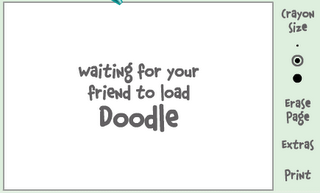

2. If the user is online (but in invisible mode), after few seconds (it can take up to one minute, depending on your connection speed), you should get a blank page like in the picture below. So you know that the user is online.
 

Enjoy Friends

Multi Google Talk Without any Software

Posted by Rahil Tuesday, January 18, 2011 0 comments

1) Right click on the Google Talk shortcut.
2) click on Properties.
3) Go to Shortcut tab on Google Talk Properties window.
4) On the Target textbox, add in the /nomutex to the end of the line so that it looks like below (or you can simply copy and paste the below syntax and replace the original).
“c:\program files\google\google talk\googletalk.exe” /nomutex
5) Click on OK.
  I didn't have to do anything after this and clicking on the shortcut multiple times just gave me different Google talk window.


Alternative

To create a new shortcut for Google Talk:

1) Right-click on the desktop or anywhere you want to place the GTalk shortcut.
2) Select New on the right click context menu.
3) Then select Shortcut.
4) Copy and paste the following line to the text box when prompted to type the location of the item:
“c:\program files\google\google talk\googletalk.exe” /nomutex

5) Click on Next.
6) Give the shortcut a proper name such as Google Talk or Google
Talk Multiple or Google Talk Polygamy.
7) Click OK until you are done.


Leave Comments

Find Who Is invisible In Gtalk

Posted by Rahil Monday, January 17, 2011 3 comments

We always have many ways to find out if user is invisible or offline on yahoo. But finding if the user is offline on Google Talk is tough before this.
Follow the steps and you will end up finding the actual status of the user.
  • Open The Chat window of the user, you want to check the status.
  • Click on option and click on “Go Off the Record”
go off the record
  • Now message user
  • If you get something in red that the user is offline and can’t receive messages that means the user is offline
offline
  • If you didn’t get any message in red that means user is online in invisible mode..:)
google talk invisible
Invisible on Google talk
Now Enjoy the tip and catch your friends who pretend to be offline.

Manage All Your IM Accounts In One

Posted by Rahil Tuesday, December 28, 2010 0 comments


Tired Of Managing All Your Instant Messaging Accounts Like Yahoo ,G Talk, MSN, My Space, etc... ?? , Then Here Is A Service Which Provides You The Facility To Sign Into All These Accounts With A Single Account.

Meebo.com Provides You This Service For Free . You Just Need To Sign Up For A FreeMeebo Account And Give Up Your IM Account's Informations , And After That You Just Need To Signin To This Meebo Account For Managing All Your IM Accounts.

Log into Two/ Multiple Yahoo Messengers at the same time

Posted by Rahil Thursday, August 19, 2010 0 comments

Have multiple yahoo accounts ? Tired switching between the messenger accounts one by one..? This tip is for you..

Usually , if we have multiple yahoo accounts , you must have to log out of the current messenger id if you want to switch to another account. But, with this trick, you can log into multiple yahoo messenger accounts at the same time..

Let's see how to do that: (for windows xp users)

1. Click on the Start » Run
2. write "regedit" and hit Enter
3. Now, on the left pan, browse to HKEY_CURRENT_USER » Software » Yahoo » Pager » Test
4. Now, Right click on that 'Test' folder and select New » DWORD Value and name that new folder as Plural
new dm value
5. Next , Right click on the "Plural" folder and select "Modify"
6. And Enter this information :
Value data : 1
Base : Decimal

edit dword value

and Click on 'OK'.

Now Close your Registry Editor by going to File » Exit 

Done! Now, you can log in to as many Yahoo accounts as you can simultaneously... Enjoy!

Multiple yahoo instances without any software

Posted by Rahil Wednesday, August 18, 2010 0 comments


Follow these steps
1. Go to Start ----> Run . Type regedit, then enter .


2.Navigate to HKEY_CURRENT_USER --------> Software --->yahoo ----->pager---->test


3.On the right pane , right-click and choose new Dword value .


4.Rename it as Plural.


5.Double click and assign a decimal value of 1.


That's it done!!
Now close registry and restart yahoo messenger .For signing in with new id open another messenger

Online Marketing
TopOfBlogs Technology blogs Internet Blogs
Computers (Hardware) - TOP.ORG Blogarama - Blog Directory tricks and tips One way text links
Submit Your Site To The Web's Top 50 Search Engines for Free!
Visit this site.

Enter email here

Join This Blog